ISPF · industrial IoT platform · SCADA · MES

Engineering. Signals. Processes. Facts.

Industrial IoT platform
from field level to MES

ISPF — one system instead of a patchwork of apps: equipment online, operator screens, production accounting, and a catalog of ready solutions. No dozen vendors and months of “gluing A to B”. Deploy on your server, on site, or in the cloud.

7.4 / 10 · competitive score (code verification, July 2026)
ispf.ai · SNMP Host Monitoring
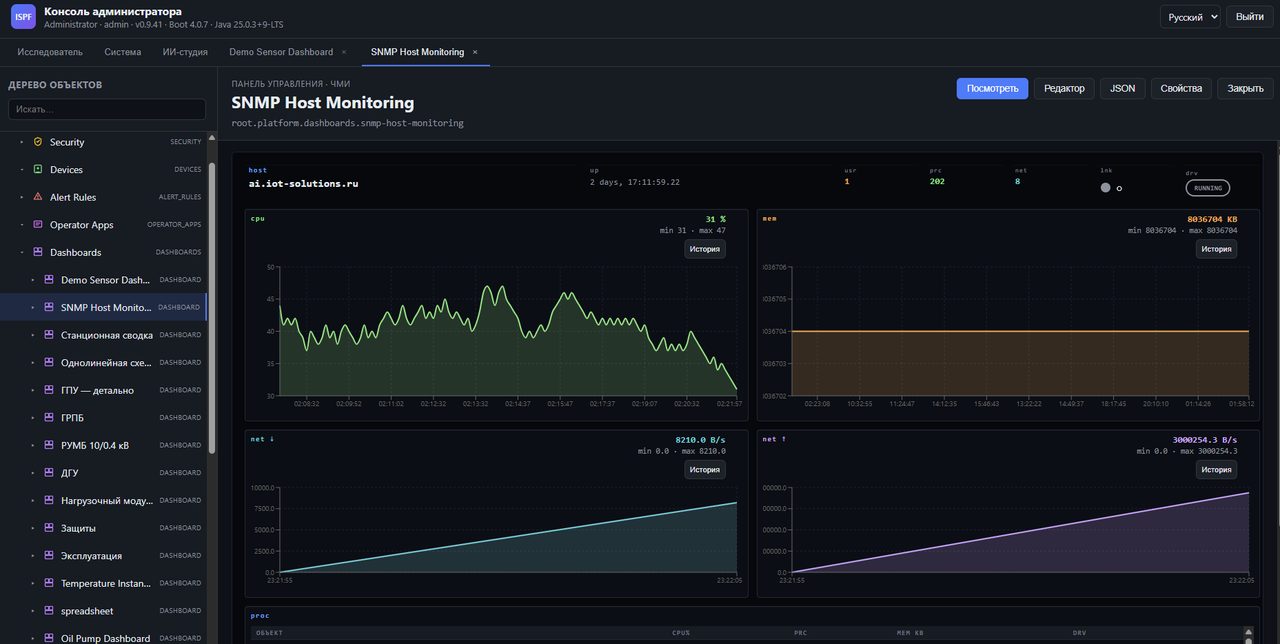
SCADA dashboard SNMP Host Monitoring: CPU, memory, network
SCADA monitoring: CPU, memory, network · data archive · real-time graphics
58
Drivers · 20 PRODUCTION
218
P&ID symbols · mnemonic diagram editor
MES
ISA-95 · OEE · batches · SPC
MFA
Two-factor sign-in · access rights
45+
Tested assistant scripts
13
Ready-made solutions in the catalog

All industrial IoT in one platform

From connecting sensors to the operator screen and shift report - setup without programming, ready-made solutions from the catalog and an assistant for the engineer and operator.

🔌

Drivers & connectivity

58 ways to connect equipment - from Modbus and OPC to MQTT. Tested on real benches, suitable for industrial use.

📊

SCADA & mimics

218 symbols for diagrams, mnemonic diagram editor, history of readings, emergency notifications, video wall and work without a network during shifts.

🏭

MES and processes

Production accounting, line efficiency, quality control, work order routes and reports - without heavy custom development.

📦

Solutions catalog

Ready-made catalog solutions — free and paid. Pick one, install — it works.

🤖

AI agent

The assistant configures the system according to your task: connects equipment, assembles screens, records everything in the log - it will not do anything without your “OK”.

🔒

Corporate Security

Two-factor input, differentiation of rights, separate circuits for different workshops - as it should be in production.

Industries & use cases

ISPF is used in manufacturing, energy, logistics, housing and communal services and other sectors - from petrochemicals and energy to smart buildings and transport.

Industrial automation Oil & gas Energy Manufacturing Transport and logistics Utilities Healthcare Agriculture Retail SCADA for renewables
Industrial automation for any specialized manufacturing.
Warehouse automation and IT infrastructure management from a single center.
SCADA integration for electrical, solar, and wind networks.
Petrochemical plant control, pump-compressor station telemetry.
Automation across raw-material production stages, monitoring of special equipment and fleet vehicles.
Cloud fleet management combined with business-process automation.
Equipment control automation and automatic meter reading.
Visualization of complex business services and data-center automation.
Medical equipment monitoring and maintenance, IT infrastructure automation.
Managed service providers — unified monitoring and control.

Three automation layers — one product

Usually they buy separately: data collection, screens, workshop accounting, and they also pay for “bringing everything together.” ISPF provides this in one system - from the sensor on the line to the shift report on the director’s desk.

IoT · field level

Connectivity and data normalization

Connection to equipment using all the usual protocols. 58 options, 20 have already been tested on stands - you can put them on site without experimenting.

  • Guidelines for pilot implementation · 3 OT-scenarios, ready for on-site visits
  • Access rights by object, two-factor login, separation of workshops
  • Screen readings are updated immediately, without delay
SCADA · operational layer

Monitoring, HMI, and mimics

Screens and mimic diagrams in the browser, 218 symbols for diagrams, video wall, work without a network, alerts and a long history of readings.

  • 218 SVG symbols: tanks, valves, pumps, RP
  • Keyboard navigation Federated node status indicator
  • Uploading history · different storage periods
MES · production layer

Accounting, processes, and reports

Ready-made accounting modules, line efficiency, quality control, work order routes and reports - without lengthy development from scratch.

  • mes-platform · warehouse · mini-tec
  • Message Events Escalation Patterns
  • Operator reports · export to Excel

Ready-made ISPF solutions

Reference deployments and reference packages on the ISPF platform. Catalog of working demos on demo.iot-solutions.ru.

🏢

Building systems monitoring

Remote meter and sensor data collection for utilities and facility operations.

Utilities (housing) Sensors Data collection
Watch demo →
🧪

LIMS

Lab process automation: requests, samples, equipment, and results in one system.

Automation Laboratory Management
Watch demo →

CoffeeGate

Remote coffee machine control: equipment state, ingredients, sales, and errors in real time.

Monitoring Equipment Analytics
Watch demo →

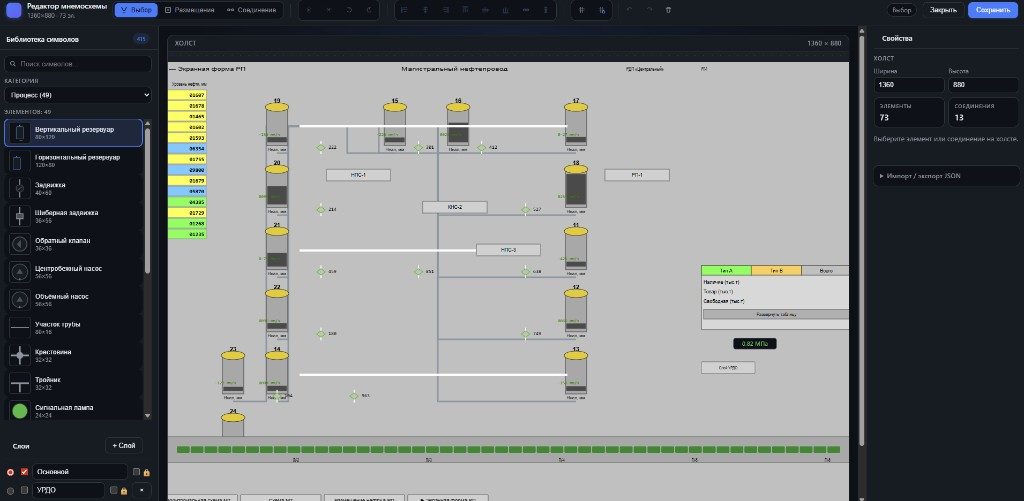
Process diagrams directly in the system - no need for a separate SCADA program

The mnemonic diagram is a living screen: the pump, valve, and level in the tank are taken from the sensors and updated themselves. The operator sees a picture of the workshop and can give commands directly from the screen - without a separate “drawing” program.

218 P&ID symbols ISA library v2: tanks, valves, pumps, pipelines, electrical equipment + symbol marketplace
The data on the diagram is live Level, pressure, emergency - immediately on the desired symbol, without manual updating
Screen control Click on a valve or pump - the command goes to the equipment
Offline operator mode If the connection is lost, the screen is not “blank”, change the operator without losing what was on the monitor

Visio Level Editor - Right in the Browser

You draw a diagram in the browser - just like in a regular editor: symbols, layers, where to take readings from. We saved it - and the same screen is already in the hands of the operator on shift.

  • Symbol libraryTanks, gate valves, pumps, pipes, crosses, signal lamps — process and electrical
  • Selection · Placement · ConnectionOrthogonal port connections, smart adhesion and mesh
  • Alignment and TransformationDistribute, flip, rotate ±90°, undo and redo
  • Properties panelWhere to get the level and color from, what to do by clicking - everything is configured in the properties window
SCADA mnemonic editor pipeline-rp RD-029
Mimic editor: main oil pipeline, symbol library, layers, and properties
SDKU RP · 49 characters · layers · communication with sensors

Drew it - and immediately changed the operator

The workshop diagram is built into the operator panel. Levels, pressure, tables - all from the same sensors, no need to enter the same thing twice.

  • One scheme - many screensDraw it once - show it both on the tablet and on a large monitor
  • Live readingsThe level in the tank, whether the valve is open, whether the line is “flowing” - you can see right away
  • Commands from the screenOpen, close, move to another section - from the same diagram
  • Industry templatesmini-TEC, pipeline SCADA RP, and 15 main oil pipeline forms (RD-029)
Operator HMI · mini-tec · scada-mimic
Operator HMI Mini-CHP with mimic diagram and real-time data
Operator interface · mimic diagram · real-time variables · alarm panel

SCADA/MES without a zoo of modules

Data collection, screens, workshop accounting - in one system, and not in five different programs. There are ready-made examples: mini-CHP, warehouse, production accounting.

Classic stack (Ignition + KEPServerEX + PI + Opcenter)

  • OPC, archive, SCADA and MES - separate vendors and licenses
  • Field and accounting integration — manual ETL, tag duplication
  • Customization = months of Java/C# and integrators at every layer
  • Screens, accidents and accounting - different programs, different contractors
  • Smart functions are a separate project, not part of the system
  • Vendor lock-in at every level of the stack

ISPF

  • Sensors, screens and workshop accounting - in one system
  • 58 ways to connect equipment · 20 tested on stands
  • History of readings · upload to Excel · several sites in one window
  • 218 P&ID symbols · mnemonic diagram editor · offline operator mode
  • Assistant built into the system · 45+ proven configuration scenarios
  • Open core + catalog of ready-made solutions · network of integrator partners
OT Trust 20 PRODUCTION drivers Compatibility laboratory, pilot implementation manual, OPC UA writeback, Driver DDK
HMI 218 P&ID + video wall Character set v2, keyboard navigation, offline operator synchronization, expression debugger
Safety MFA · ACL · multi-tenancy TOTP connection, ACL per variable, hard multi-tenancy, audit log
Data Archive ClickHouse · Parquet Archive levels, Parquet mass export via REST, SLA confirmation in the laboratory
MES ISA-95 · OEE · batch mes-platform package, dispatch, quality/SPC, end-to-end agent deployment
Automation BPMN depth Subprocesses, message events, escalation templates, CEP stubs
AI Agent autopilot 45+ regression scenarios, solution generator, deployment without LLM test
Ecosystem Marketplace - general availability View · installation · activation, partner levels, symbol marketplace

IoT · 20 PRODUCTION

Modbus, OPC UA, S7, BACnet, IEC-104, DNP3 - CI compatibility and pilot implementation guidelines.

SCADA · 218 P&ID

Advanced mnemonic editor, video wall, offline operator mode, ClickHouse archive, Parquet export.

MES · ISA-95

mes-platform, OEE, batches/SPC, BPMN subprocesses - declarative MES without Java.

🛒

Solutions catalog

Catalog of packages and character sets: viewing, one-click installation, paid activation.

🤝

Partner program

Associate to Expert certification, curriculum, revenue share.

Federation + Helm

Node status, tunnel to the periphery, Helm chart for Kubernetes - distributed sites.
ISPF and competitors

Comparison on a scale of 1-10 relative to Ignition, KEPServerEX, OSIsoft PI, Siemens Opcenter, Tulip and mature IIoT platforms with context tree.

7.4 / 10 · overall code-based score · July 2026
Everything in one structure
8.5
Setup Assistant
6.5
Clear documentation
8.5
MES / ISA-95
6.5
OT/IT communications (drivers)
6.5
Security / RBAC / multi-tenancy
7.5
Speed ​​of implementation without programmers
8.0
Deployment / scale / periphery
7.0
SCADA / HMI / mimics
7.5
Archive/time series
7.0
Automation and alarms
7.5
Processes / BPMN
7.5
Catalog of ready-made solutions
5.0
Stack modernity
9.5
Criterion ISPF Ignition KEPServerEX + PI Siemens Opcenter Tulip
Unified IoT+SCADA+MES model ✓ One structure for the entire plant First SCADA, MES separately Connection and archive MES only Shop Applications
Development with AI at the core ✓ Built-in setup assistant Limited
Own infrastructure / isolated circuit ✓ AGPL + package SaaS First
Marketplace package ✓ Installation + activation Module store Application Templates
BPMN processes in the platform ✓ Built-in Separately ✓ MES processes
Editor of P&ID-mnemonic diagrams in the browser ✓ 218 characters ✓ Perspective
Stack 2026 Spring Boot 4 · React 19 Desktop in Java Legacy Windows Enterprise .NET Modern web

Equipment efficiency, dispatch, quality control and batch accounting - a workshop management system without programming

Plastic bag mes-platform-production — certified demo script: operator screen with “Dispatching”, “Efficiency” and “Quality” tabs. Business logic is configured without Java in the core - through process scripts and data queries.

  • DispatchingProcess scenario: work order → task queue → confirmation on the operator’s screen
  • Equipment efficiencyAvailability × productivity × quality · inventory of production lines · morning shift rate ~85%
  • Quality controlStatistical control schedule · test samples from the package
  • Production batchesStep-by-step execution of the recipe · exchange with the accounting system · catalog of solutions in the object tree
Operator · mes-platform-production · BPMN dispatching
MES: BPMN work order dispatching with real-time execution log
MES dispatch · user task → task queue · mes-platform-production package

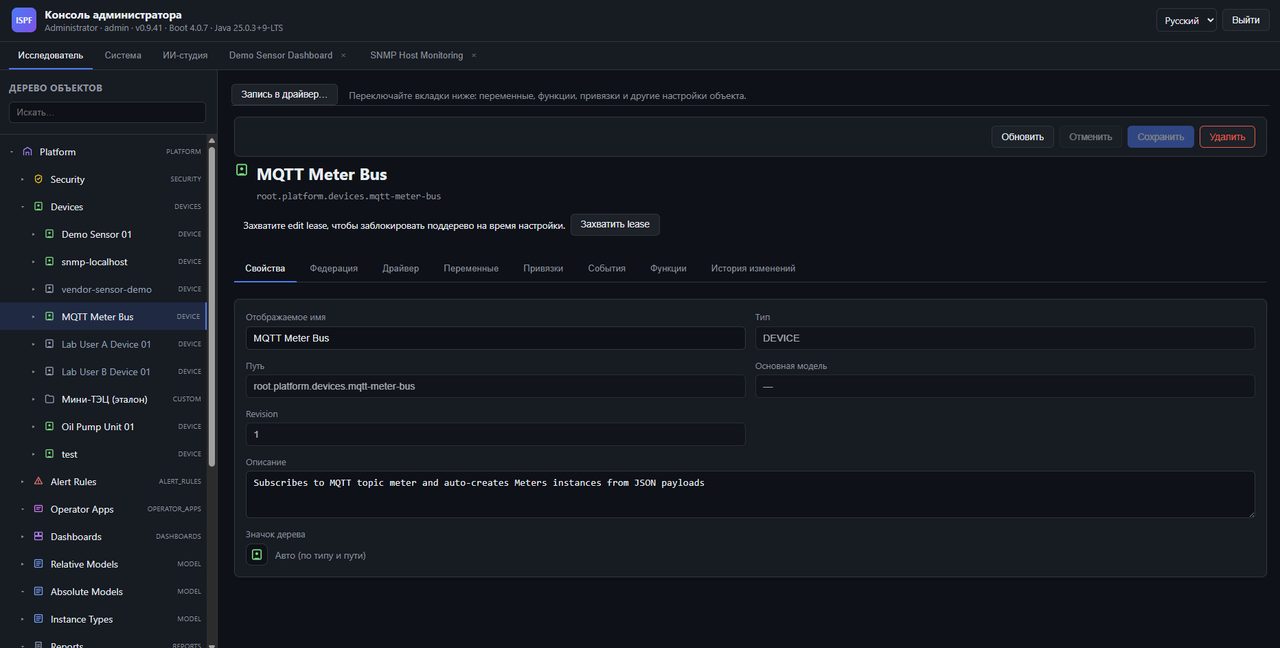
Everything is factory-made - in one clear structure

Workshop → line → pump → sensor: everything is laid out on the shelves. The new Wi‑Fi meter can appear in the system yourself, without manually entering each field.

  • Sensors connect themselvesSent the data - the device appeared in the catalog
  • Formulas and conditions“If the temperature is above 80 - alarm” without a programmer
  • Testimony historySchedules for shift, month, year · upload to file
  • Who sees what?The operator has his own workshop, the director has the entire plant
Browser mqtt-meter-bus
Object Explorer: MQTT Meter Bus with auto-connection
MQTT Meter Bus · auto-creation of meters from JSON payload

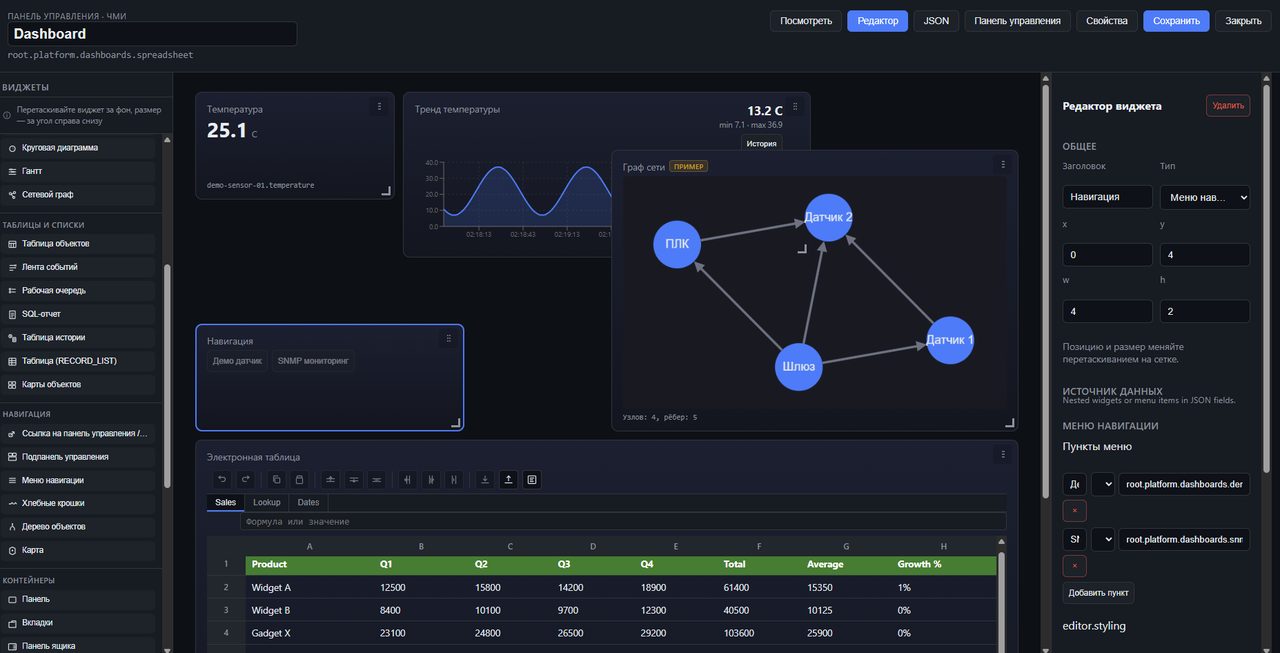
Operator screens of any complexity - assembled by dragging elements

40+ widgets: charts, indicators, network graph, tables, map, single-line diagrams. Improve the screens created by the AI ​​studio in the visual editor.

  • Network graphPLC → gateway → sensors topology on one screen
  • Table widgetTables with formulas directly on the dashboard
  • JSON editorCode layout for advanced users
  • Related tablesI selected a line in the table - the graph along this line was updated next to it
Dashboard designer · table
Dashboard editor: graph, network graph, table
Graph · network graph · table · navigation - on one screen

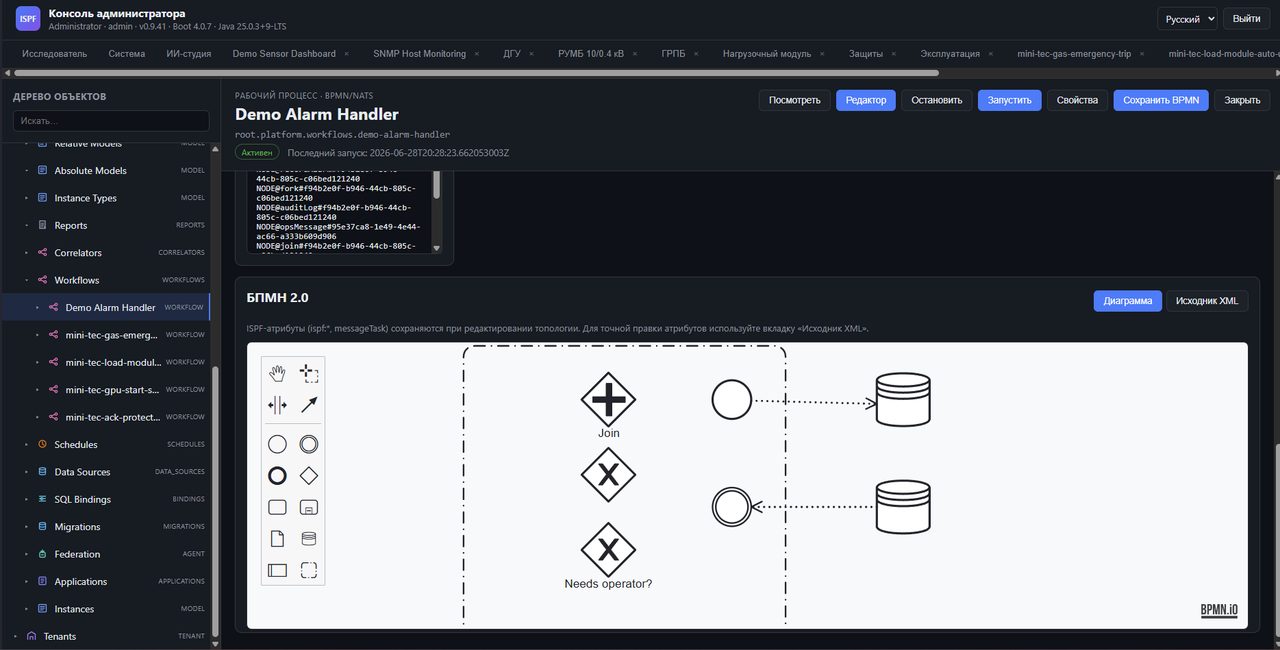
Process automation without programming

BPMN 2.0 editor with real-time logs, custom queued tasks, CEL gateways and alarm rules are all like nodes in an object tree.

  • Tasks → queueAccept/end directly from the operator sidebar
  • Service tasksfire_event, read_variable, start_workflow
  • Execution logReal-time process debugging
  • Diagram + XMLVisual editor and source BPMN
Process demo-alarm-handler
BPMN Editor Demo Alarm Handler with Real Time Log
Alarm handler (demo) active BPMN.io and execution log

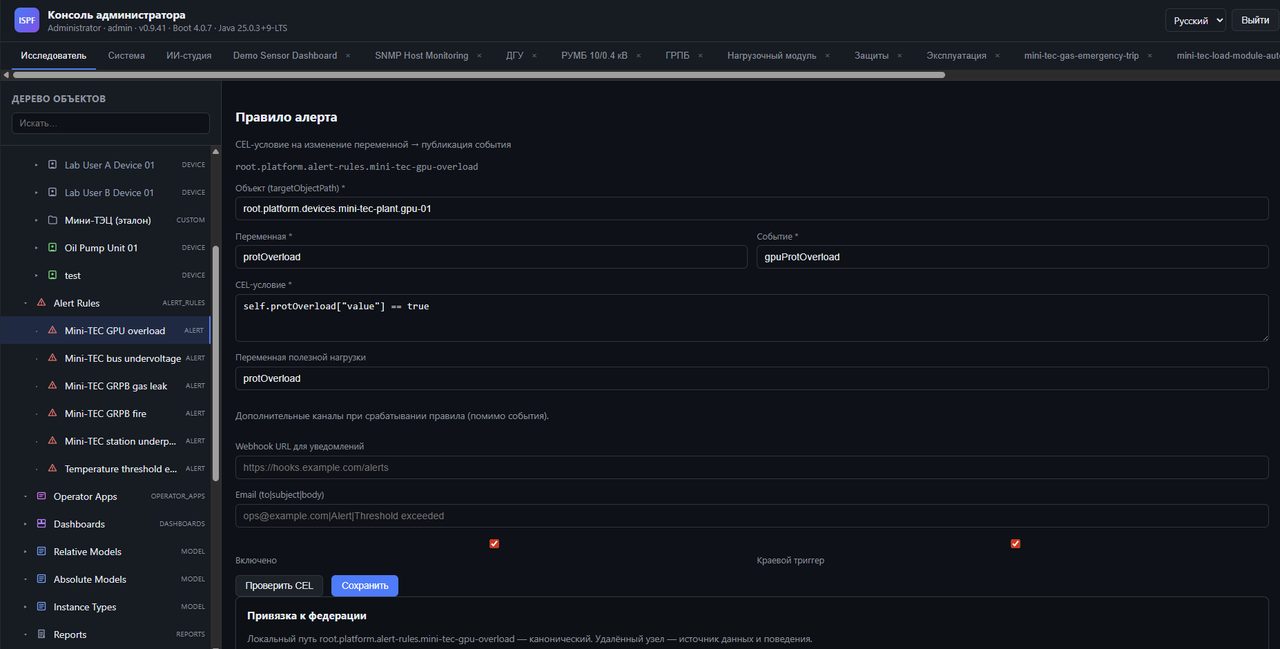
Customizable alarms with notifications to external systems and email - ready right away

We set up the rule once: “if the pressure is higher than normal, call the dispatcher and write a letter to the shift supervisor.” It worked - the system itself sends a notification or launches the desired script.

  • Condition checkButton "Check expression" before saving
  • External notifications and mailIntegration with PagerDuty, Slack and email
  • Industry rulesVideo card overload, gas leak, fire - from the box to mini-tec
  • Event correlatorsCounting, sequence, chain of events → process start
Alarm rule mini-tec-gpu-overload
Mini-CHP alarm rule: video card overload due to logical condition
Mini-CHP: video card overload · logical condition · external notification · mail

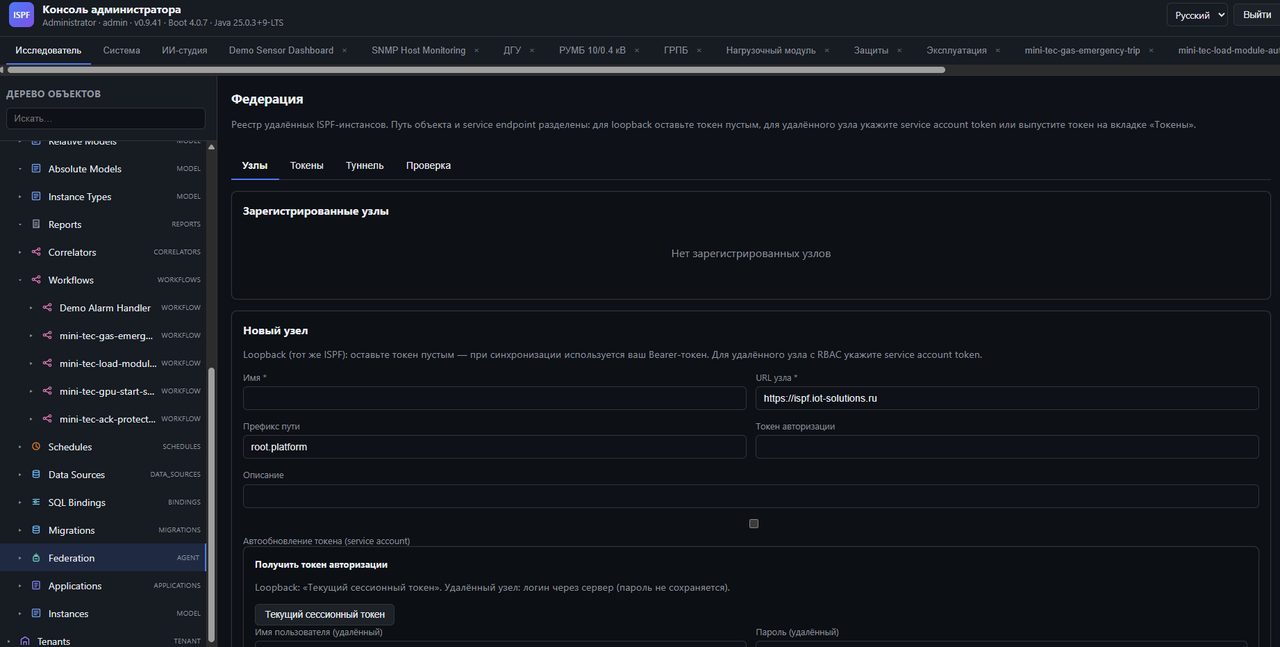
Several sites - one window for the manager

A factory in the region, a warehouse in the city, an office - you see everything in one system, even if the sites behind different networks and without a “white” IP.

  • List of sitesAdded a branch - it appeared in the general catalog
  • General list of equipmentYou can see where it is, without calling every workshop
  • One factory cardThe remote site looks like its own site in the same scheme
  • Internet communicationThe platform itself “calls” upstairs - no need to break through the firewall
Federation · node registry
Federation panel: node registry, tokens, tunnel
Federation · nodes · tokens · tunnel · health check

MES functions

JSON script environment: setVar, when/if, INVOKE_FUNCTION - business logic without Java on the server.

SQL reports

Reports in SQL with parameters, export from the operator shell.

Helm and Kubernetes

Helm chart, ConfigMap, federation status survey - cloud deployment.

From installation to operator HMI

We installed the system, selected a ready-made solution from the catalog, connected the equipment, displayed the diagram on the screen - without the annual project “implementation of automated process control systems”.

Step 1
Install On a server or in the cloud, you can launch a pilot in days, not in a quarter.
Step 2
Solutions catalog Mini-CHP, warehouse, workshop accounting - selected and installed as an application on the phone.
Step 3
Drivers Modbus, OPC UA, SNMP, MQTT - declarative configuration and compatibility laboratory.
Step 4
SCADA / MES Circuits, panels and operator screens are in the same system, not in a third program.
Step 5
Industrial operation Access rights, backup copies, control of work - as expected at the site.

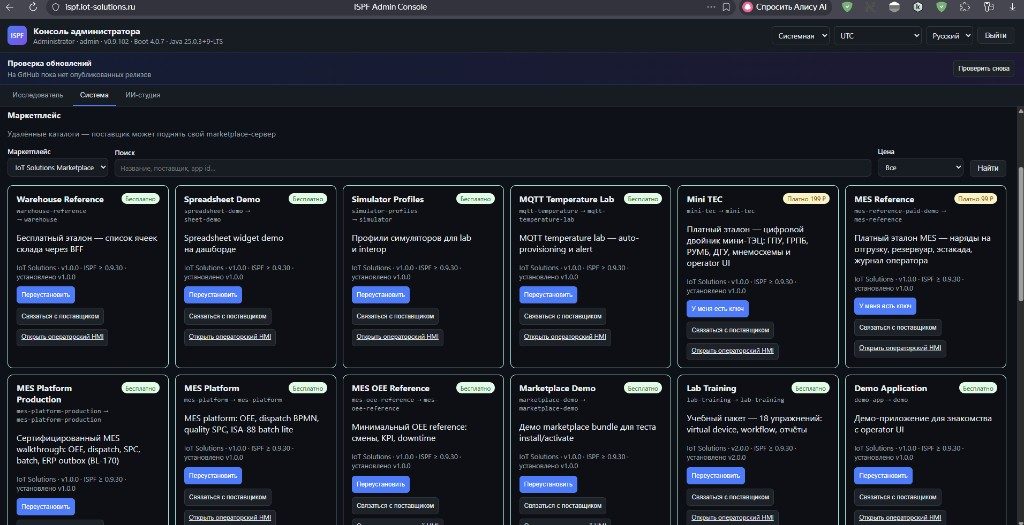
Ready-made solutions in the ISPF catalog

ISPF’s own developments, plus solutions from the community and certified integrators. Some are free to try on your site; some are paid, with vendor activation and support. In the app, open Solutions and click Install — or go to marketplace.ispf.ai.

System → Solutions → Catalog · ISPF
ISPF solution catalog: browse, install, and open the operator screen
Solution catalog · free and paid · one-click install

See it on the demo stand

On ispf.iot-solutions.ru, catalog solutions are already deployed — open the operator screen and see how it would look at your plant, without installing anything on your side.

  • From ISPFReference solutions for typical tasks: power, warehouse, shop-floor accounting
  • From partnersIndustry-specific add-ons and modules from certified integrators
  • Free and paidTry first — activate a license later if the solution fits

🛒 Solution catalog

No need to start from scratch: pick a ready solution, install it on your server, and tune it for your site. Diagram symbols, application modules, and full configurations — in one catalog.

  • Install from the app — no separate installer
  • Free solutions — no key; paid — vendor activation code
  • Symbol packs for process diagrams
  • Manual upload if the site has no internet

🤝 Partner program

A network of integrators and developers who deploy ISPF on sites and publish their solutions in the catalog. Training, certification, and rollout support — when you need a contractor, not just software.

  • Certified integrators by skill level
  • Partners publish their solutions in the shared catalog
  • Training and exams for your rollout team
  • Partner directory — who can help at your site

AI accelerates SCADA and MES rollout

The assistant speeds up setup: connect equipment, assemble the screen. On shift, the operator asks “show me the report” - and receives an answer in Russian, according to your regulations.

For the administrator · AI studio

Assistant for Engineer

Write a task in Russian - the assistant will create a device, a screen, and set up an alert. Every step is visible and can be undone.

  • Agent Application Package Settings
  • Test → dry run → publish
  • OpenAI, Ollama, any compatible API
  • Background execution + MCP for Cursor
For the operator · application AI agent

Assistant on the operator's screen

Chat on top of the operator shell: reports, dashboards, trends, session memory - with instructions and technical documentation of your application.

  • Knowledge base: MD, TXT, CSV, JSON, YAML
  • Instructions for agent by industry
  • Run reports and navigate to screens
  • Configurable in operator applications
IoTDriver · device · variables
SCADAMnemonic diagram · dashboard · alarms
MESReports · BPMN · features
+ AIStudio · operator agent

“Create SNMP localhost and CPU/RAM/network dashboard” — done

The agent works on a living tree of objects: creates snmp-localhost, configures metrics, builds HMI — with a transparent step log and “Open device” links.

  • Multi-chatContext persists across tabs and reloads
  • Package generationPrompt → JSON manifest → validation → publish
  • Platform ToolsDrivers, BFF, processes, correlators, federation
  • Context package58 drivers, widget types, reference applications in the prompt
AI studio → snmp-host-monitoring
SNMP Host Monitoring dashboard created via the AI studio
Agent Result: SNMP Monitoring CPU Memory Network

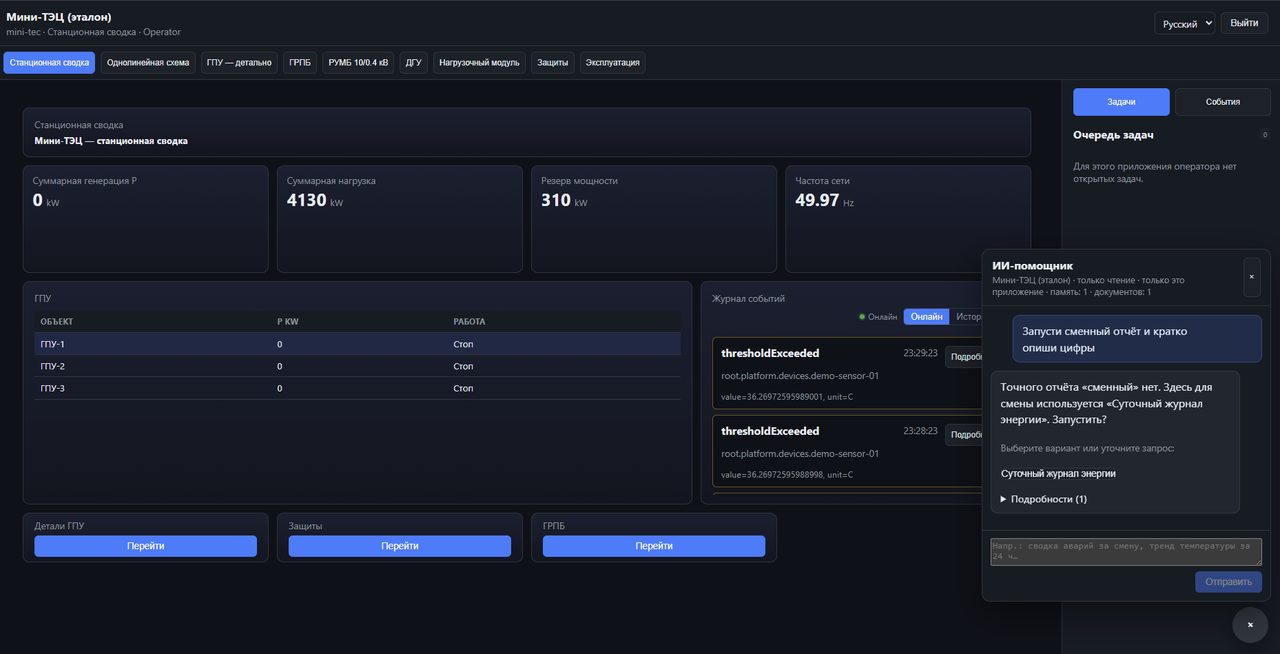
The operator asks — the agent acts

On the mini-TEC HMI, the operator types “Run shift report” — the agent finds the SQL report, offers a run button, and explains station summary figures in Russian.

  • Natural languageReports, trends, alarms — without menus and search
  • Application Toolslist_reports, open_dashboard, invoke_bff
  • Progress in real timeWebSocket agent steps in sidebar
  • Session memoryDialog context within a shift
Operator · AI assistant · mini-tec
AI operator assistant on the mini-TEC HMI
Station summary and agent chat · replaceable energy log

Knowledge base and instructions — no code

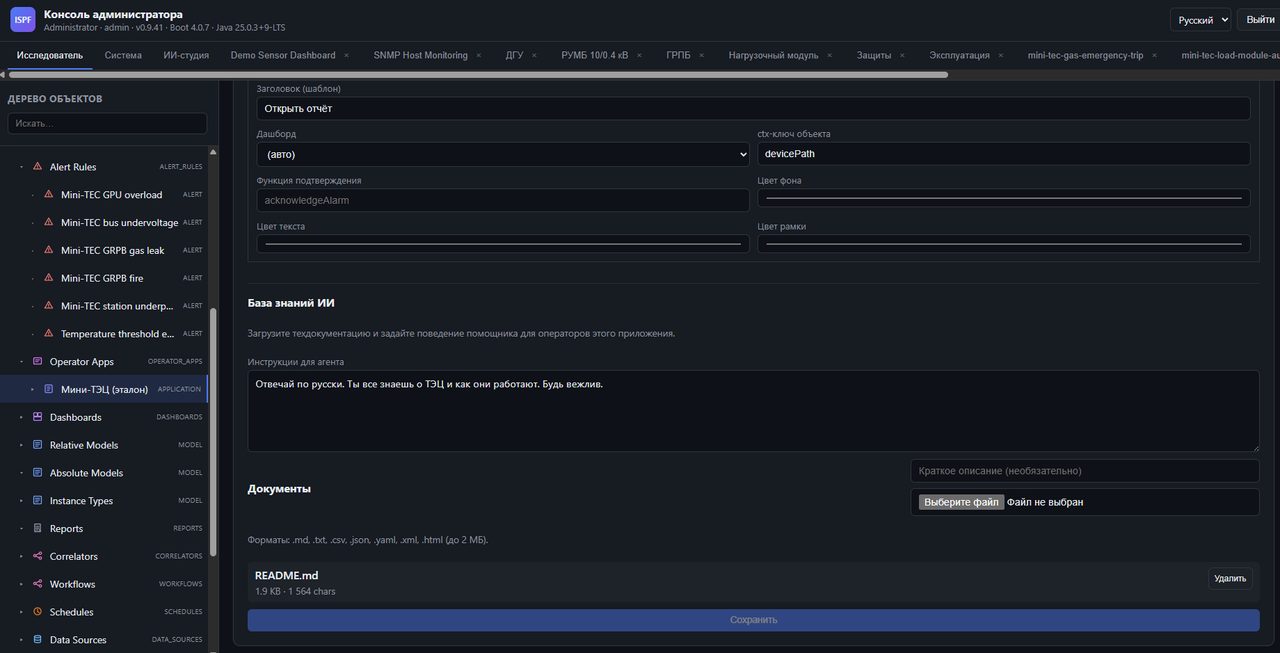
In operator applications, download SOPs, READMEs, regulations. Set the system prompt: “Answer in Russian, know everything about the thermal power plant, be polite” - the agent will become an expert on your site.

  • Loading the knowledge baseTechnical documentation up to 2 MB per file
  • Agent InstructionsTone, language, safety priorities
  • Isolation by applicationEach operator application has its own agent
  • RAG on documentationAnswers grounded in your files
Operator Applications AI Knowledge Base
Setting up an AI knowledge base for the Mini-CHP operator application
Mini-CHP · instructions · README.md in the knowledge base

Industrial stack 2026

Field protocols, archive on TimescaleDB, BPMN and web HMI on React - ready for industrial use in energy, oil and gas and discrete manufacturing.

Modbus OPC UA MQTT SNMP TimescaleDB ClickHouse Archive levels Export Parquet BPMN 2.0 Google CEL PostgreSQL Java 25 Spring Boot 4.0 React 19 Keycloak OIDC NATS Helm / K8s Solutions catalog AI studio Operator agent

Get in touch

Write or call - we will answer on implementation, licensing and partnership.

Contact us

ISPF is a product of IoT Solutions. Licensing, deployment, and partnerships:

+7 (495) 006 42 36 info@iot-solutions.ru

Tver · serving customers across Russia

Platform & demo

View ISPF at the demo stand or install the package from the marketplace.

demo.iot-solutions.ru — solution examples ispf.iot-solutions.ru — ISPF demo stand Catalog Partner portal

Ready to deploy ISPF?

Open a demo stand or install a package from the marketplace - mini-TEC, mes-platform, SNMP monitoring, and BPMN.